
We are excited to announce that we have released the Out of Office functionality!
Below is a brief summary of the new feature.
How does it work
When an Authoriser submits a Leave Application, a pop-up screen will appear with an Out of Office Nominee selection.
The Authoriser selects a Nominee to approve any Leave and/or Claim Applications on their behalf.
If the Authoriser wishes to continue approving their employees’ applications, they can select themself as a Nominee.
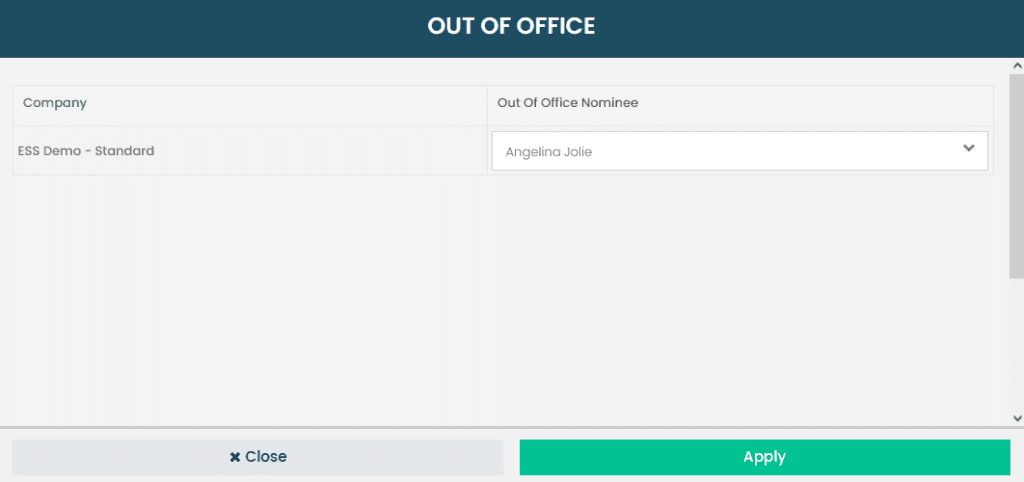
Select a nominee on this screen to give them access to your employees’ application authorisations during your leave period.
If you wish to remain the only one approving your employees’ leave applications, you may select yourself on this pop-up screen.
The Communication Structure
The Nominee will be notified of Pending Authorisations during an Authoriser’s leave period.
Authorisers will also receive confirmation notifications of submitted applications as well as application outcomes.
The standard Employee Application notifications remain in place as usual.
The Technical Stuff
Nominee Information will be recorded if they authorise on-behalf of an Authoriser.
Authorisers and Nominees will both have access to authorise applications during the Authoriser’s leave period.
The Nominee’s authorisation access is revoked once the Authoriser’s leave period ends.
Nominees can be changed at any time in the “My Profile” section.
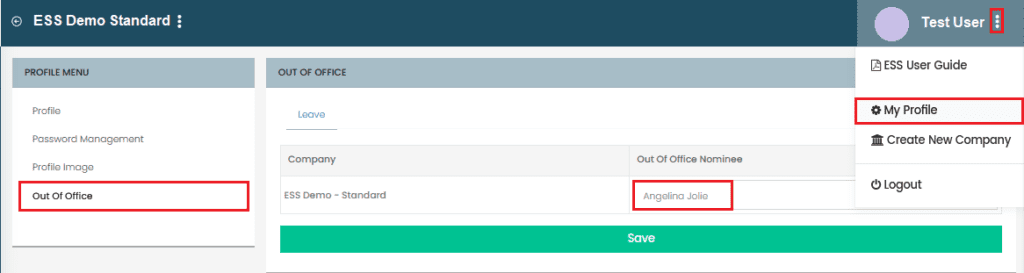
Changing your Out of Office nominee from your computer
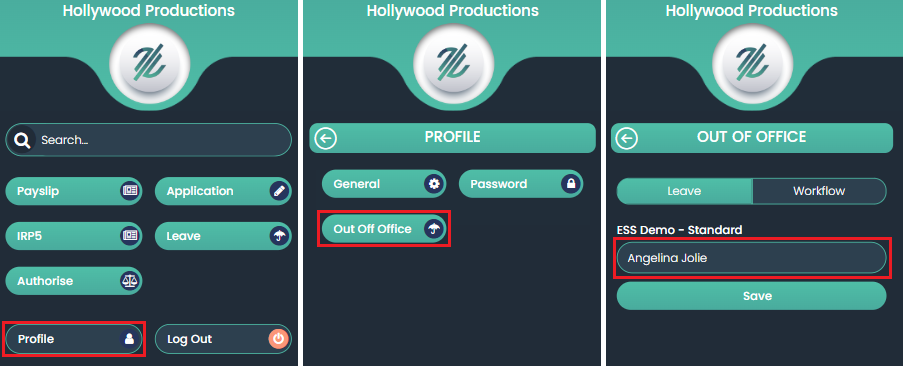
Changing your Out of Office nominee from your mobile device